i’m not *too* geekafied, but as i wander the streets of the blogosphere, i noticed a few things and thought i should contribute some knowledge (which has been passed down to me by many older, wiser, bloggers) and some things i’ve just learned on my own.
1. SUBSCRIBING TO BLOGS – i realize this is blogging 101, but you’d be surprised how many people are unfamiliar with RSS readers and email subscriptions.
do you bookmark all your favorite blogs or manually type them in when you visit them? save yourself a ton of time by subscribing.
you can do this easily by subscribing by email (click here to do that with my blog) and have my updates come straight to your inbox.
or, use an RSS reader like google reader or bloglines. all of your favorite blogs should have a subscribe button (mine is up top under my header that says “feed”) and by clicking on this on each of those blogs, you are pretty much consolidating all the blogs you read into one webpage! it is automatically updated whenever someone posts something.
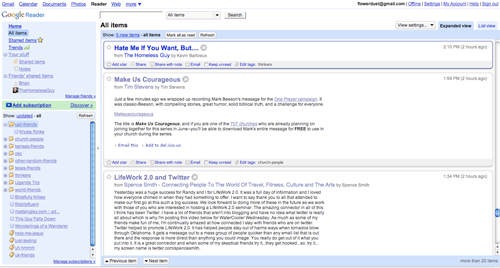
i use google reader…here’s a screenshot. see how all the blogs i read are in that window? i can just scroll through them all to read them, and click on them if i want to leave a comment.
use a reader to subscribe to my blog by clicking here!
2. POST TITLES – see how in the URL bar it has my domain, then is followed by the date, and then the title of this post? this helps people find your blog through SEO (or search engine optimization). sometimes blogs use a numbering system instead…search engines don’t like that.
use thoughtful titles and you’ll have more people discover what you’re blogging about.
3. IMAGE TITLES – you know how when you upload pics from your camera, they are named DSC_009 or something? if you change that and use the same hyphenation technique as in #2, this will also help search engines (and especially image searches) find your blog. i’d like to bring some more exposure to compassion international, so for the sponsorship posts, i title my photos “compassion-international-uganda-childname.jpg”
name-your-pics-like-this.jpg and more people will find relevant content on your blog!
there are a million other little things that help make your blog easy to find and easy to read…but these are three important ones!
any tips you’d like to share?
Comments
26 responses to “does a blogologist use latex gloves?”
thanks, Anne! I know about RSS and using decent titles in posts, but had no idea about the SEO date and title in the url.
hey, wordpress users: it’s a quick fix. look under Settings then Permalinks. very easy.
tolerating a bathing suit in public,
monica
… and that still doesn’t sound right. ha ha :)
i came to the blogosphere anticipating your subject matter to be “panties peeking above the top of pants waistlines” or “why are pants so tiny, my rear so big, and my undies so tall”
or just simply “a woman’s fascination with showing the butt cleavage ”
but, you did get close i admit
if you were a pure marketer you would have made the tie from mams to nets like – for every guy that admitted they stare at mams they must repent by buying a net!
mosquitos would be extinct in africa
Thanks for the tips. I’ve been inconsistent in how I name pictures. I’ll pay more attention now.
Also, I wrote a how-to about Google Reader for my wife’s blog that might be helpful for some of your readers who want to follow your first suggestion.
Use titles like “My Thoughts On Boobies”.
commenting on other blogs will bring more traffic to yours…that’s how i found anne!
i can’t help but be a little proud at how tidy with folders is your g.reader.
i use Google Reader, but instead of reading the posts there, i open the interesting ones in new tabs. i like to read posts in their native environment :)
and good point about naming pictures. i need to be better about that.
I utilize the “Next” button feature on Google Reader. It’s up on my toolbar, and clicking it takes me to the actual blog(s) with an updated post. I prefer reading the blog on the blog site rather than in email format. I also like blogs in their native format.
I like going to the actual blog, but because of this post alone, I did subscribe to multiple sites just now through Google Reader.
http://www.vagabondrunn.wordpress.com
Thanks for the tips! i’m trying to build up my blog traaffic so this helps! any other tips?
If anyone has outlook 2007 you can subscribe to feed in outlook so that the posts arrive in your RSS inbox much like email. I love using this feature because it helps me organize and keep up with the many subscriptions I have and when I see cool posts, I can forward them to my friends directly from outlook like an email. Good stuff. Love RSS!
Also, if you’re looking for a desktop app feed reader, on Mac, I suggest checking out NetNewsWire or FeedDemon if you’re on Windows.
I use both of them. FeedDemon at work, NetNewswire at home on the mac, and Newsgator Go! on the Blackberry.
Head over to http://www.newsgator.com/Individuals/Default.aspx and check it out. They’re free.
I can’t imagine what I did before my RSS reader. Great tips Anne.
I was wondering though, what are you using to let RSS readers click on the comments section straight from our reader? I love that, and rarely see it anywhere.
Be funny and profound.
Thanks Anne…I just set up my google reader! Sweet!
How thoughtful to help us. Thanks! Happy Birthday to Chris, your precious hubs. Oh wow – to be 27 again. When I was 27, I had been married for 1 year, still honeymooning!
Chris, I know you don’t know me from Adam, but please know your wife is a perfect angel just being so transparent for all of us who love her blog writings! Have fun today!!!
Thanks Anne. Never thought about renaming my pics. I’ve been trying to boost the ol’ Tentmaker blog traffic as well, so any help is awesome.
Trying to keep my eyes up today all day! ;)
I must do this post sometime too over at my blog. I have someone who finds my blog each day by searching for “grinch”. Maybe RSS subscriptions would be overcomplicating things for them? ;-)
Thanks for the tips – as a blog newbie I need all the info I can get. I just started using a reader two weeks ago (I’ve been reading blogs for 18months) and it has changed my life. I wasted so much time before!
I always wondered about how the whole “RSS subscriber” things work. thanks!
Also, in the efforts to become more blog-savvy, I’m trying to put the blogs I read daily on my blog roll, so others can enjoy them….hope it’s okay that I added you…!?
1. Be Real
2. Keep drama to a minimum
3. Don’t try too hard
4. See Tony’s post :)
EVERYONE keeps telling me to do google reader. Seriously, EVERYONE – I wouldn’t be surprised if someone stopped me in the grocery store tomorrow to tell me! For some reason, I have this large aversion to google reader or anything of the sort. I feel like it’ll ruin my nightly ritual of happily clicking through the internet. It’s my non-mommy time. I like it. I don’t want google reader to take it away from me by doing all the work.
(I am also the girl who refuses to watch lost or like dirty dancing simply because too many other people do – so it could also just be my inner protester coming out, hehe.)
if i write a post with links to other blogs, i always load up my blog right after i have published and click all those outgoing links so they get a referral from the post i just wrote.
i’m sure everyone is psycho about stats and referrals just like me…
great idea with renaming the images. I never thought of it that way. Thanks for the tips!
Google reader is my best friend. Especially since I can pull up the mobile Google site on my iphone, sign in, and have all my blogs with me for those boring moments standing in line or wherever. It makes me happy knowing I always have something with me to read!
Thank you, Anne, for sharing your knowledge. The blogging community is so…communal! I love that. Great post.